<?php
$currentPage  = 'features';
$pageTitle    = 'Features — Greasely Workshop Management Software';
$pageDesc     = 'Explore every feature Greasely offers: job management, quoting, invoicing, technician scheduling, mobile app, 2-way SMS/email messaging, parts management, and vehicle lookup.';
$pageKeywords = 'workshop management features, auto repair job management, technician scheduling software, auto repair invoicing, mobile workshop app, parts management, vehicle lookup';
include 'includes/header.php';
?>

<!-- Page Hero -->
<section class="page-hero" aria-label="Features overview">
  <div class="container">
    <div class="section-label" style="background:rgba(255,255,255,.15);border-color:rgba(255,255,255,.25);color:#fff;margin-bottom:16px;" aria-hidden="true">Platform Features</div>
    <h1 class="page-hero__title">Every tool your workshop needs</h1>
    <p class="page-hero__sub">Greasely replaces the whiteboards, spreadsheets, and sticky notes with one powerful platform — purpose-built for auto repair professionals.</p>
    <button class="btn btn-white btn-lg" onclick="openTrialModal()">
      Try All Features Free for 2 Weeks
    </button>
  </div>
</section>

<!-- ══════════════════════════════════════
     FEATURE: JOB & TASK MANAGEMENT
══════════════════════════════════════ -->
<section class="section" id="jobs" aria-labelledby="feat-jobs-heading">
  <div class="container">
    <div class="feature-row">
      <div class="feature-row__content">
        <div class="section-label" aria-hidden="true">Job Management</div>
        <h2 class="feature-row__title" id="feat-jobs-heading">From estimate to invoice — nothing falls through</h2>
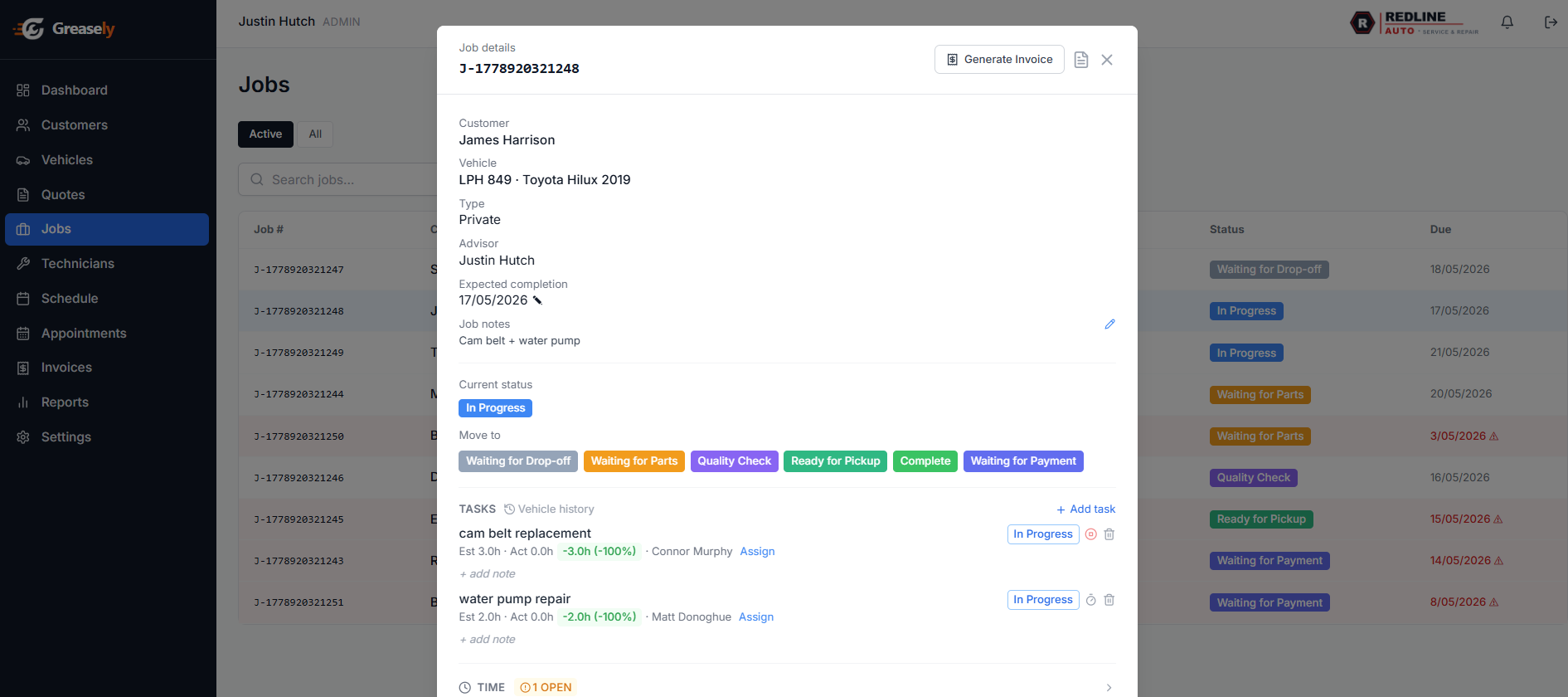
        <p class="feature-row__text">The visual job board gives every member of your team instant clarity on what needs doing, who's doing it, and where each vehicle is in the repair process.</p>
        <ul class="feature-list" aria-label="Job management feature details">
          <li><svg viewBox="0 0 24 24" fill="none" stroke="currentColor" stroke-width="2.5" stroke-linecap="round" stroke-linejoin="round" aria-hidden="true"><polyline points="20 6 9 17 4 12"/></svg> Kanban board with customisable status columns</li>
          <li><svg viewBox="0 0 24 24" fill="none" stroke="currentColor" stroke-width="2.5" stroke-linecap="round" stroke-linejoin="round" aria-hidden="true"><polyline points="20 6 9 17 4 12"/></svg> Convert accepted quotes to jobs in a single click</li>
          <li><svg viewBox="0 0 24 24" fill="none" stroke="currentColor" stroke-width="2.5" stroke-linecap="round" stroke-linejoin="round" aria-hidden="true"><polyline points="20 6 9 17 4 12"/></svg> Sub-tasks assigned to specific technicians with time estimates</li>
          <li><svg viewBox="0 0 24 24" fill="none" stroke="currentColor" stroke-width="2.5" stroke-linecap="round" stroke-linejoin="round" aria-hidden="true"><polyline points="20 6 9 17 4 12"/></svg> Overdue alerts and priority flags</li>
          <li><svg viewBox="0 0 24 24" fill="none" stroke="currentColor" stroke-width="2.5" stroke-linecap="round" stroke-linejoin="round" aria-hidden="true"><polyline points="20 6 9 17 4 12"/></svg> Full job history linked to vehicle and customer profiles</li>
        </ul>
      </div>
      <div aria-hidden="true">
        <div class="app-screenshot">
          <div class="app-screenshot__bar">
            <span class="app-screenshot__dot"></span><span class="app-screenshot__dot"></span><span class="app-screenshot__dot"></span>
            <span class="app-screenshot__url">app.greasely.com/jobs</span>
          </div>
          <img src="/images/screenshots/screenshot-job-detail.png" alt="Greasely job detail — status pipeline, tasks and time tracking" loading="lazy">
        </div>
      </div>
    </div>
  </div>
</section>

<!-- ══════════════════════════════════════
     FEATURE: CUSTOMERS & VEHICLES
══════════════════════════════════════ -->
<section class="section section--bg" id="customers" aria-labelledby="feat-customers-heading">
  <div class="container">
    <div class="feature-row feature-row--reverse">
      <div class="feature-row__content">
        <div class="section-label" aria-hidden="true">Customer &amp; Vehicle Records</div>
        <h2 class="feature-row__title" id="feat-customers-heading">Every customer, every car — always at your fingertips</h2>
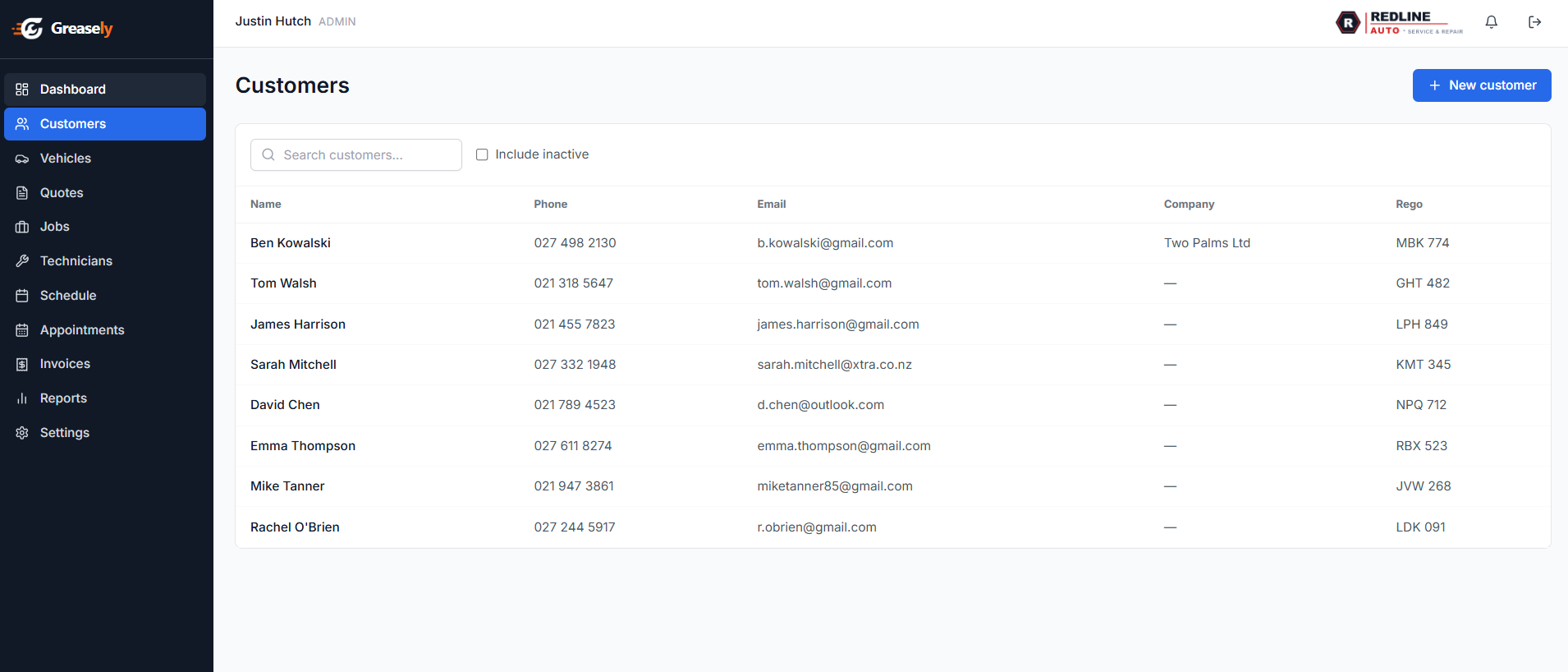
        <p class="feature-row__text">Never ask a returning customer what car they drive again. Greasely builds rich profiles for every customer and vehicle, complete with full service histories that help you deliver a truly professional experience.</p>
        <ul class="feature-list" aria-label="Customer and vehicle features">
          <li><svg viewBox="0 0 24 24" fill="none" stroke="currentColor" stroke-width="2.5" stroke-linecap="round" stroke-linejoin="round" aria-hidden="true"><polyline points="20 6 9 17 4 12"/></svg> Customer profiles with contact details and preferences</li>
          <li><svg viewBox="0 0 24 24" fill="none" stroke="currentColor" stroke-width="2.5" stroke-linecap="round" stroke-linejoin="round" aria-hidden="true"><polyline points="20 6 9 17 4 12"/></svg> Vehicle records with service history, notes, and photos</li>
          <li><svg viewBox="0 0 24 24" fill="none" stroke="currentColor" stroke-width="2.5" stroke-linecap="round" stroke-linejoin="round" aria-hidden="true"><polyline points="20 6 9 17 4 12"/></svg> Link multiple vehicles to one customer</li>
          <li><svg viewBox="0 0 24 24" fill="none" stroke="currentColor" stroke-width="2.5" stroke-linecap="round" stroke-linejoin="round" aria-hidden="true"><polyline points="20 6 9 17 4 12"/></svg> Quick search by name, rego, or VIN</li>
        </ul>
      </div>
      <div aria-hidden="true">
        <div class="app-screenshot">
          <div class="app-screenshot__bar">
            <span class="app-screenshot__dot"></span><span class="app-screenshot__dot"></span><span class="app-screenshot__dot"></span>
            <span class="app-screenshot__url">app.greasely.com/customers</span>
          </div>
          <img src="/images/screenshots/screenshot-customer.png" alt="Greasely customer list — every customer, every car, always at your fingertips" loading="lazy">
        </div>
      </div>
    </div>
  </div>
</section>

<!-- ══════════════════════════════════════
     FEATURE: QUOTING & INVOICING
══════════════════════════════════════ -->
<section class="section" id="invoicing" aria-labelledby="feat-invoicing-heading">
  <div class="container">
    <div class="feature-row">
      <div class="feature-row__content">
        <div class="section-label" aria-hidden="true">Quoting &amp; Invoicing</div>
        <h2 class="feature-row__title" id="feat-invoicing-heading">Professional quotes. Effortless invoicing. Faster payment.</h2>
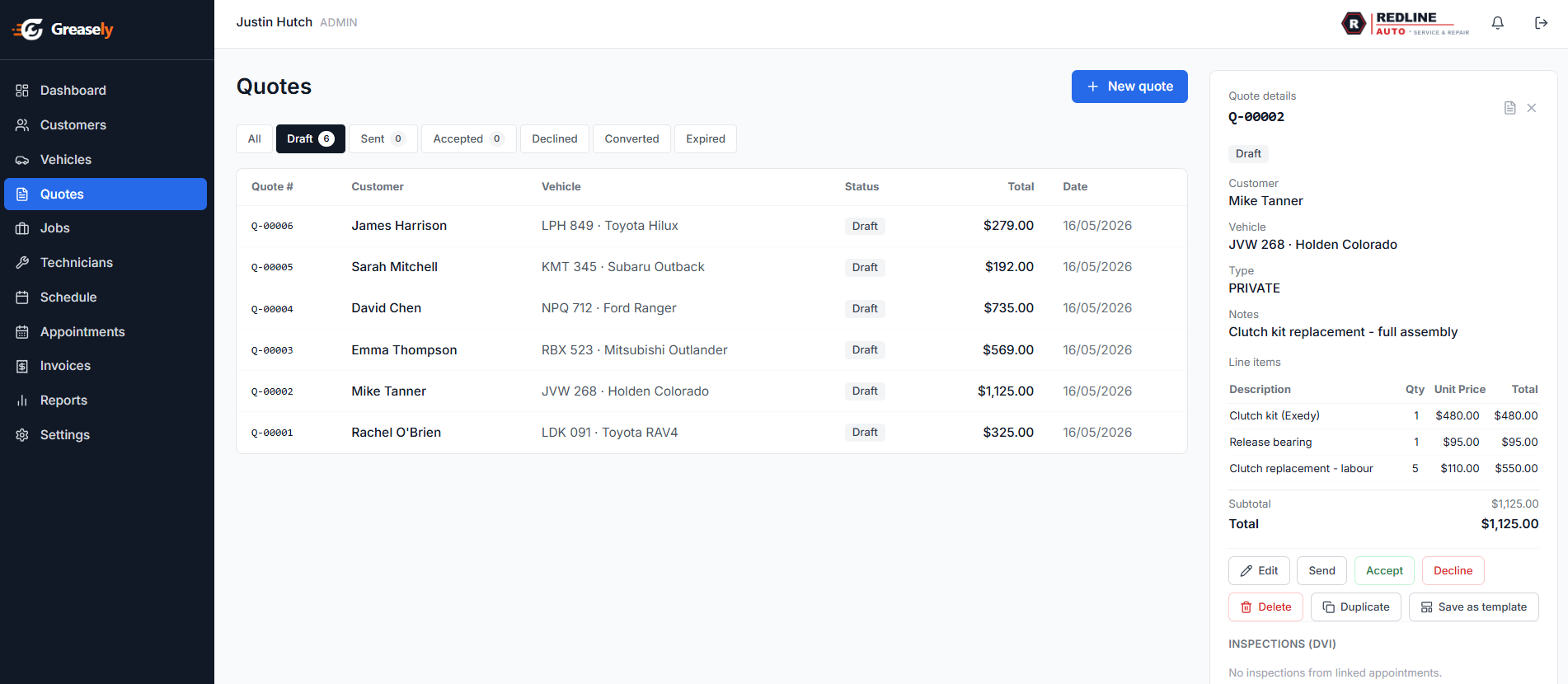
        <p class="feature-row__text">Impress customers with detailed, professional quotes and get paid faster with invoices that generate themselves. Stripe integration means customers can pay online — no more chasing cash.</p>
        <ul class="feature-list" aria-label="Quoting and invoicing features">
          <li><svg viewBox="0 0 24 24" fill="none" stroke="currentColor" stroke-width="2.5" stroke-linecap="round" stroke-linejoin="round" aria-hidden="true"><polyline points="20 6 9 17 4 12"/></svg> Detailed quotes with labour, parts, and notes</li>
          <li><svg viewBox="0 0 24 24" fill="none" stroke="currentColor" stroke-width="2.5" stroke-linecap="round" stroke-linejoin="round" aria-hidden="true"><polyline points="20 6 9 17 4 12"/></svg> One-click quote-to-job conversion on customer acceptance</li>
          <li><svg viewBox="0 0 24 24" fill="none" stroke="currentColor" stroke-width="2.5" stroke-linecap="round" stroke-linejoin="round" aria-hidden="true"><polyline points="20 6 9 17 4 12"/></svg> Auto-generated invoices pre-filled from job details</li>
          <li><svg viewBox="0 0 24 24" fill="none" stroke="currentColor" stroke-width="2.5" stroke-linecap="round" stroke-linejoin="round" aria-hidden="true"><polyline points="20 6 9 17 4 12"/></svg> Online payment via Stripe — card, bank transfer, and more</li>
          <li><svg viewBox="0 0 24 24" fill="none" stroke="currentColor" stroke-width="2.5" stroke-linecap="round" stroke-linejoin="round" aria-hidden="true"><polyline points="20 6 9 17 4 12"/></svg> Partial payments and payment plan recording</li>
          <li><svg viewBox="0 0 24 24" fill="none" stroke="currentColor" stroke-width="2.5" stroke-linecap="round" stroke-linejoin="round" aria-hidden="true"><polyline points="20 6 9 17 4 12"/></svg> Automated overdue reminders by SMS and email</li>
        </ul>
      </div>
      <div aria-hidden="true">
        <div class="app-screenshot">
          <div class="app-screenshot__bar">
            <span class="app-screenshot__dot"></span><span class="app-screenshot__dot"></span><span class="app-screenshot__dot"></span>
            <span class="app-screenshot__url">app.greasely.com/quotes</span>
          </div>
          <img src="/images/screenshots/screenshot-quote.png" alt="Greasely quotes list — from estimate to invoice, nothing falls through, with line items and totals" loading="lazy">
        </div>
      </div>
    </div>
  </div>
</section>

<!-- ══════════════════════════════════════
     FEATURE: INVOICE TRACKING
══════════════════════════════════════ -->
<section class="section section--bg" id="invoice-tracking" aria-labelledby="feat-invoices-heading">
  <div class="container">
    <div class="feature-row feature-row--reverse">
      <div class="feature-row__content">
        <div class="section-label" aria-hidden="true">Invoice Tracking</div>
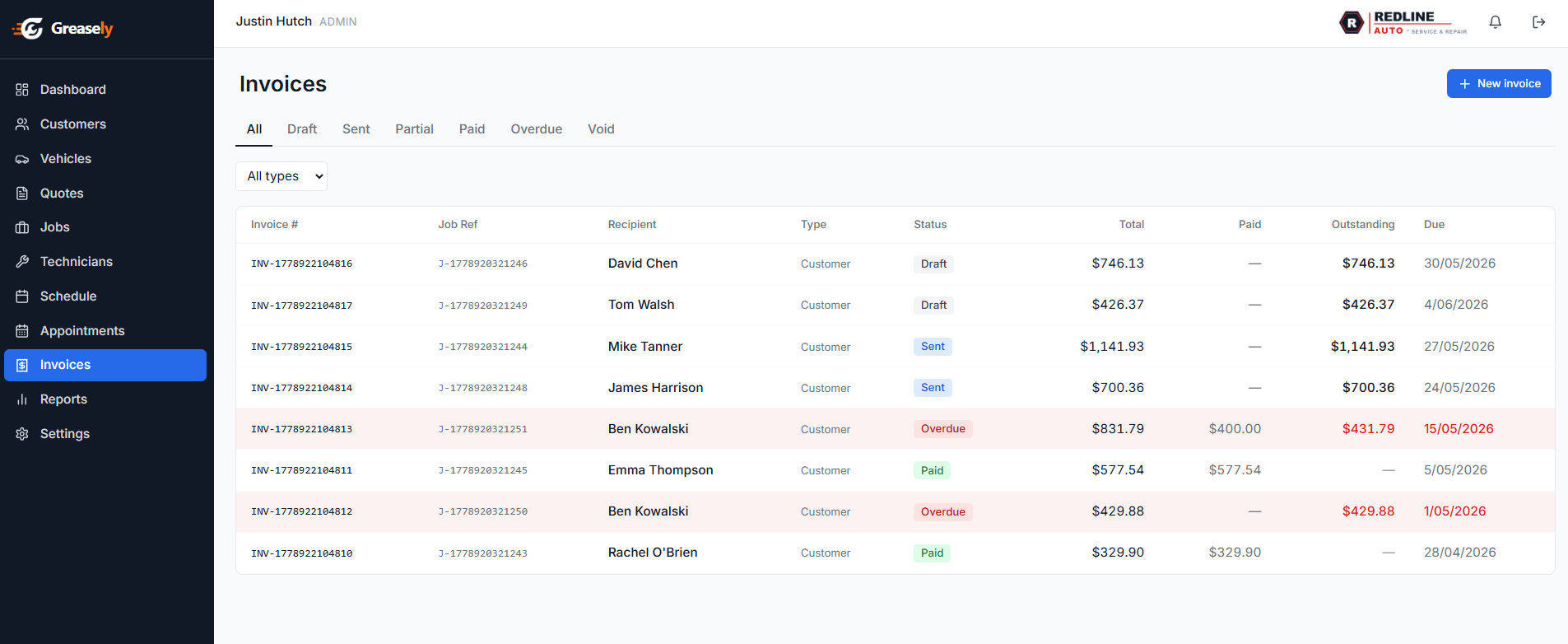
        <h2 class="feature-row__title" id="feat-invoices-heading">Know exactly who owes what — at a glance</h2>
        <p class="feature-row__text">Greasely's invoice tracker gives you a live view of every invoice across every stage — from draft through to paid. Spot overdue accounts instantly, record partial payments, and stop money slipping through the cracks.</p>
        <ul class="feature-list" aria-label="Invoice tracking features">
          <li><svg viewBox="0 0 24 24" fill="none" stroke="currentColor" stroke-width="2.5" stroke-linecap="round" stroke-linejoin="round" aria-hidden="true"><polyline points="20 6 9 17 4 12"/></svg> Filter by Draft, Sent, Partial, Paid, Overdue, and Void</li>
          <li><svg viewBox="0 0 24 24" fill="none" stroke="currentColor" stroke-width="2.5" stroke-linecap="round" stroke-linejoin="round" aria-hidden="true"><polyline points="20 6 9 17 4 12"/></svg> Outstanding balance highlighted on every row</li>
          <li><svg viewBox="0 0 24 24" fill="none" stroke="currentColor" stroke-width="2.5" stroke-linecap="round" stroke-linejoin="round" aria-hidden="true"><polyline points="20 6 9 17 4 12"/></svg> Record partial payments and track remaining balance</li>
          <li><svg viewBox="0 0 24 24" fill="none" stroke="currentColor" stroke-width="2.5" stroke-linecap="round" stroke-linejoin="round" aria-hidden="true"><polyline points="20 6 9 17 4 12"/></svg> Overdue invoices flagged in red with due date</li>
          <li><svg viewBox="0 0 24 24" fill="none" stroke="currentColor" stroke-width="2.5" stroke-linecap="round" stroke-linejoin="round" aria-hidden="true"><polyline points="20 6 9 17 4 12"/></svg> Every invoice linked directly to the originating job</li>
          <li><svg viewBox="0 0 24 24" fill="none" stroke="currentColor" stroke-width="2.5" stroke-linecap="round" stroke-linejoin="round" aria-hidden="true"><polyline points="20 6 9 17 4 12"/></svg> Send payment links via SMS or email in one click</li>
        </ul>
      </div>
      <div aria-hidden="true">
        <div class="app-screenshot">
          <div class="app-screenshot__bar">
            <span class="app-screenshot__dot"></span><span class="app-screenshot__dot"></span><span class="app-screenshot__dot"></span>
            <span class="app-screenshot__url">app.greasely.com/invoices</span>
          </div>
          <img src="/images/screenshots/screenshot-invoices.png" alt="Greasely invoice list showing invoices in draft, sent, partially paid, paid, and overdue states" loading="lazy">
        </div>
      </div>
    </div>
  </div>
</section>

<!-- ══════════════════════════════════════
     FEATURE: SCHEDULING
══════════════════════════════════════ -->
<section class="section" id="scheduling" aria-labelledby="feat-scheduling-heading">
  <div class="container">
    <div class="feature-row">
      <div class="feature-row__content">
        <div class="section-label" aria-hidden="true">Technician Scheduling &amp; Time Tracking</div>
        <h2 class="feature-row__title" id="feat-scheduling-heading">The right tech on the right job, every time</h2>
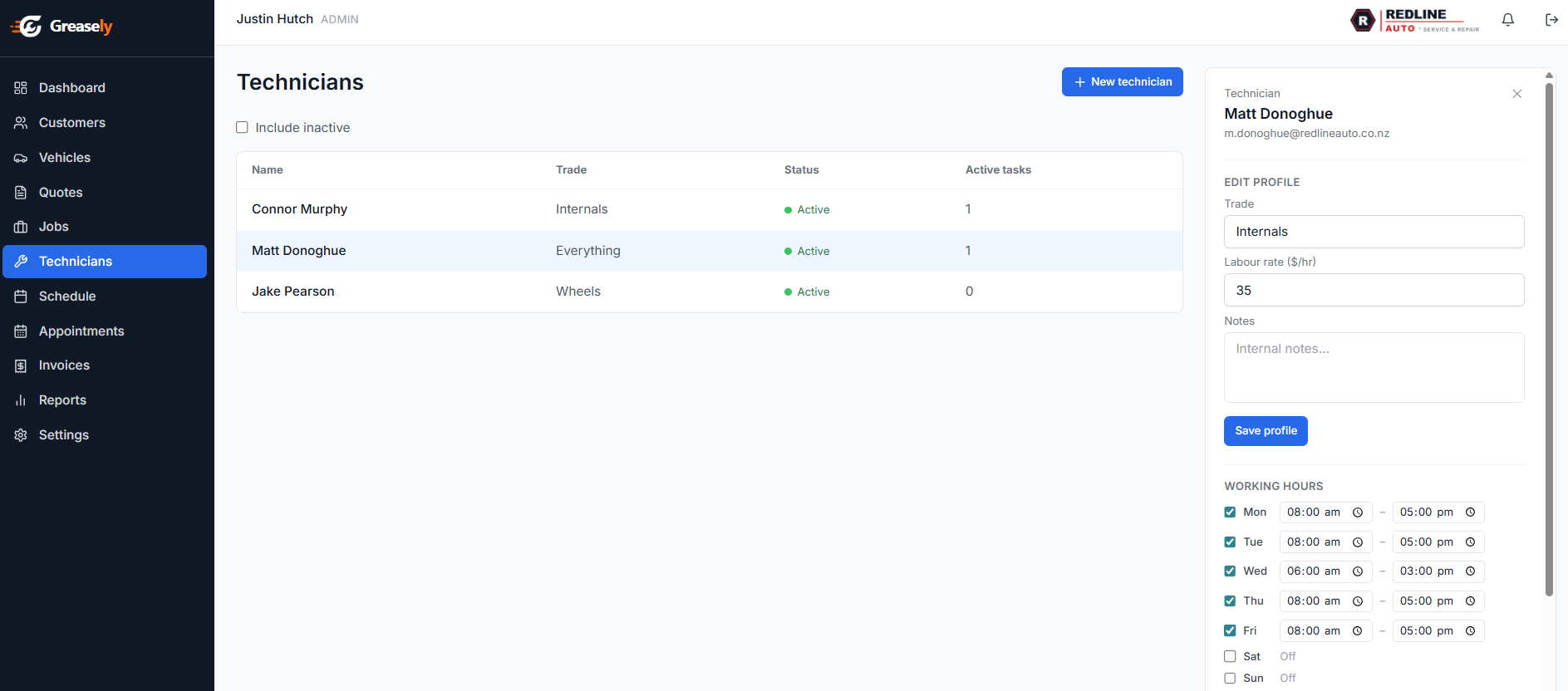
        <p class="feature-row__text">Stop the guesswork. Greasely's drag-and-drop scheduler shows real-time technician availability and capacity so you can confidently book more work without burning out your team.</p>
        <ul class="feature-list" aria-label="Scheduling features">
          <li><svg viewBox="0 0 24 24" fill="none" stroke="currentColor" stroke-width="2.5" stroke-linecap="round" stroke-linejoin="round" aria-hidden="true"><polyline points="20 6 9 17 4 12"/></svg> Drag-and-drop technician schedule view</li>
          <li><svg viewBox="0 0 24 24" fill="none" stroke="currentColor" stroke-width="2.5" stroke-linecap="round" stroke-linejoin="round" aria-hidden="true"><polyline points="20 6 9 17 4 12"/></svg> Skill-based assignment — match jobs to qualified techs</li>
          <li><svg viewBox="0 0 24 24" fill="none" stroke="currentColor" stroke-width="2.5" stroke-linecap="round" stroke-linejoin="round" aria-hidden="true"><polyline points="20 6 9 17 4 12"/></svg> Capacity planning to avoid overbooking</li>
          <li><svg viewBox="0 0 24 24" fill="none" stroke="currentColor" stroke-width="2.5" stroke-linecap="round" stroke-linejoin="round" aria-hidden="true"><polyline points="20 6 9 17 4 12"/></svg> Time clock — techs clock on/off via mobile or web</li>
          <li><svg viewBox="0 0 24 24" fill="none" stroke="currentColor" stroke-width="2.5" stroke-linecap="round" stroke-linejoin="round" aria-hidden="true"><polyline points="20 6 9 17 4 12"/></svg> Actual vs. estimated time reporting</li>
        </ul>
      </div>
      <div aria-hidden="true">
        <div class="app-screenshot">
          <div class="app-screenshot__bar">
            <span class="app-screenshot__dot"></span><span class="app-screenshot__dot"></span><span class="app-screenshot__dot"></span>
            <span class="app-screenshot__url">app.greasely.com/technicians</span>
          </div>
          <img src="/images/screenshots/screenshot-technician.png" alt="Greasely technician list — assign the right tech to the right job with skills, availability, and labour rates at a glance" loading="lazy">
        </div>
      </div>
    </div>
  </div>
</section>

<!-- ══════════════════════════════════════
     FEATURE: MOBILE APP
══════════════════════════════════════ -->
<section class="section" id="mobile" aria-labelledby="feat-mobile-heading">
  <div class="container">
    <div class="feature-row">
      <div class="feature-row__content">
        <div class="section-label" aria-hidden="true">Mobile App</div>
        <h2 class="feature-row__title" id="feat-mobile-heading">Your workshop in every technician's pocket</h2>
        <p class="feature-row__text">The Greasely mobile app keeps your technicians connected from the workshop floor. Clock in, view job details, update status, and record time — all without a desk computer. Available on iOS and Android.</p>
        <ul class="feature-list" aria-label="Mobile app features">
          <li><svg viewBox="0 0 24 24" fill="none" stroke="currentColor" stroke-width="2.5" stroke-linecap="round" stroke-linejoin="round" aria-hidden="true"><polyline points="20 6 9 17 4 12"/></svg> Clock on/off from the workshop floor</li>
          <li><svg viewBox="0 0 24 24" fill="none" stroke="currentColor" stroke-width="2.5" stroke-linecap="round" stroke-linejoin="round" aria-hidden="true"><polyline points="20 6 9 17 4 12"/></svg> View and update job cards and task status</li>
          <li><svg viewBox="0 0 24 24" fill="none" stroke="currentColor" stroke-width="2.5" stroke-linecap="round" stroke-linejoin="round" aria-hidden="true"><polyline points="20 6 9 17 4 12"/></svg> Push notifications for new jobs and updates</li>
          <li><svg viewBox="0 0 24 24" fill="none" stroke="currentColor" stroke-width="2.5" stroke-linecap="round" stroke-linejoin="round" aria-hidden="true"><polyline points="20 6 9 17 4 12"/></svg> Record labour time on the go</li>
          <li><svg viewBox="0 0 24 24" fill="none" stroke="currentColor" stroke-width="2.5" stroke-linecap="round" stroke-linejoin="round" aria-hidden="true"><polyline points="20 6 9 17 4 12"/></svg> Works offline with sync when back online</li>
        </ul>
        <div style="margin-top:24px;">
          <span class="section-label" style="margin-right:12px;">Available on Mobile plan and above</span>
        </div>
      </div>
      <div aria-hidden="true">
        <div style="display:flex;justify-content:center;">
          <div style="width:200px;">
            <div class="mockup" style="border-radius:24px;">
              <div class="mockup__bar" style="justify-content:center;">
                <div style="width:60px;height:6px;background:#cbd5e1;border-radius:3px;"></div>
              </div>
              <div class="mockup__body" style="min-height:340px;padding:16px;">
                <div style="font-size:.7rem;font-weight:700;color:#475569;margin-bottom:10px;">My Jobs Today</div>
                <div class="ui-kanban-card" style="margin-bottom:8px;"><div class="ui-kanban-card-title" style="height:10px;"></div><div class="ui-kanban-card-sub" style="height:8px;"></div><div style="display:flex;gap:6px;margin-top:6px;"><div class="ui-kanban-card-tag tag-amber" style="height:16px;width:50px;"></div><div class="ui-kanban-card-tag" style="height:16px;width:60px;background:#dbeafe;"></div></div></div>
                <div class="ui-kanban-card" style="margin-bottom:8px;"><div class="ui-kanban-card-title" style="height:10px;"></div><div class="ui-kanban-card-sub" style="height:8px;"></div><div style="display:flex;gap:6px;margin-top:6px;"><div class="ui-kanban-card-tag tag-green" style="height:16px;width:50px;"></div><div class="ui-kanban-card-tag" style="height:16px;width:60px;background:#dbeafe;"></div></div></div>
                <div style="background:#2563eb;border-radius:8px;height:36px;margin-top:16px;display:flex;align-items:center;justify-content:center;">
                  <div style="width:80px;height:10px;background:rgba(255,255,255,.5);border-radius:4px;"></div>
                </div>
                <div style="font-size:.7rem;font-weight:700;color:#475569;margin-top:16px;margin-bottom:6px;">Time Recorded</div>
                <div style="background:#f8fafc;border-radius:6px;padding:8px;text-align:center;">
                  <div style="font-size:.875rem;font-weight:900;color:#2563eb;">4h 35m</div>
                  <div style="font-size:.625rem;color:#94a3b8;">of 8h target</div>
                </div>
              </div>
            </div>
          </div>
        </div>
      </div>
    </div>
  </div>
</section>

<!-- ══════════════════════════════════════
     FEATURE: SMS & EMAIL (All Inclusive)
══════════════════════════════════════ -->
<section class="section section--bg" id="messaging" aria-labelledby="feat-messaging-heading">
  <div class="container">
    <div class="feature-row feature-row--reverse">
      <div class="feature-row__content">
        <div class="section-label" aria-hidden="true">2-Way SMS &amp; Email Messaging</div>
        <h2 class="feature-row__title" id="feat-messaging-heading">Talk to customers without picking up the phone</h2>
        <p class="feature-row__text">Send and receive SMS and email messages directly within Greasely. Send job updates, request approvals for additional work, and answer customer questions — all logged against the job automatically.</p>
        <ul class="feature-list" aria-label="Messaging features">
          <li><svg viewBox="0 0 24 24" fill="none" stroke="currentColor" stroke-width="2.5" stroke-linecap="round" stroke-linejoin="round" aria-hidden="true"><polyline points="20 6 9 17 4 12"/></svg> Two-way SMS conversations within the job view</li>
          <li><svg viewBox="0 0 24 24" fill="none" stroke="currentColor" stroke-width="2.5" stroke-linecap="round" stroke-linejoin="round" aria-hidden="true"><polyline points="20 6 9 17 4 12"/></svg> Automated status updates when job progresses</li>
          <li><svg viewBox="0 0 24 24" fill="none" stroke="currentColor" stroke-width="2.5" stroke-linecap="round" stroke-linejoin="round" aria-hidden="true"><polyline points="20 6 9 17 4 12"/></svg> Appointment reminders to reduce no-shows</li>
          <li><svg viewBox="0 0 24 24" fill="none" stroke="currentColor" stroke-width="2.5" stroke-linecap="round" stroke-linejoin="round" aria-hidden="true"><polyline points="20 6 9 17 4 12"/></svg> Invoice delivery and payment reminders via SMS or email</li>
          <li><svg viewBox="0 0 24 24" fill="none" stroke="currentColor" stroke-width="2.5" stroke-linecap="round" stroke-linejoin="round" aria-hidden="true"><polyline points="20 6 9 17 4 12"/></svg> Conversation history linked to customer records</li>
        </ul>
        <div style="margin-top:24px;">
          <span class="section-label" style="margin-right:12px;">All Inclusive plan</span>
        </div>
      </div>
      <div aria-hidden="true">
        <div class="mockup">
          <div class="mockup__bar">
            <div class="mockup__dots"><span></span><span></span><span></span></div>
            <div class="mockup__url">SMS Thread — Sarah Johnson</div>
          </div>
          <div class="mockup__body" style="display:flex;flex-direction:column;gap:8px;">
            <div style="align-self:flex-start;background:#f1f5f9;border-radius:12px 12px 12px 2px;padding:8px 14px;font-size:.75rem;color:#334155;max-width:70%;">Hi Sarah, your vehicle is ready for collection!</div>
            <div style="align-self:flex-end;background:#2563eb;border-radius:12px 12px 2px 12px;padding:8px 14px;font-size:.75rem;color:#fff;max-width:70%;">Great, thanks! Can I pay online?</div>
            <div style="align-self:flex-start;background:#f1f5f9;border-radius:12px 12px 12px 2px;padding:8px 14px;font-size:.75rem;color:#334155;max-width:70%;">Yes! Here's your invoice link: [Pay Online]</div>
            <div style="align-self:flex-end;background:#2563eb;border-radius:12px 12px 2px 12px;padding:8px 14px;font-size:.75rem;color:#fff;max-width:70%;">Paid! Thanks for the great service 🙌</div>
            <div style="margin-top:auto;display:flex;gap:8px;">
              <div style="flex:1;height:32px;background:#f8fafc;border:1px solid #e2e8f0;border-radius:8px;"></div>
              <div style="width:32px;height:32px;background:#2563eb;border-radius:8px;"></div>
            </div>
          </div>
        </div>
      </div>
    </div>
  </div>
</section>

<!-- ══════════════════════════════════════
     FEATURE: PARTS & VEHICLE LOOKUP
══════════════════════════════════════ -->
<section class="section" id="parts" aria-labelledby="feat-parts-heading">
  <div class="container">
    <header class="section-header section-header--center">
      <div class="section-label" aria-hidden="true">All Inclusive Plan</div>
      <h2 class="section-title" id="feat-parts-heading">Parts, stock &amp; vehicle data — all in one place</h2>
      <p class="section-sub">The All Inclusive plan gives you a complete parts management system and live vehicle lookup so you can quote accurately and source parts faster.</p>
    </header>

    <div class="grid-3">
      <article class="card feature-grid-card">
        <div class="feature-icon feature-icon--lg">
          <svg viewBox="0 0 24 24" fill="none" stroke="currentColor" stroke-width="2" stroke-linecap="round" stroke-linejoin="round" aria-hidden="true"><path d="M21 16V8a2 2 0 0 0-1-1.73l-7-4a2 2 0 0 0-2 0l-7 4A2 2 0 0 0 3 8v8a2 2 0 0 0 1 1.73l7 4a2 2 0 0 0 2 0l7-4A2 2 0 0 0 21 16z"/></svg>
        </div>
        <h3 class="feature-grid-card__title">Parts &amp; Stock Management</h3>
        <p class="feature-grid-card__text">Maintain a full parts catalogue with stock levels, reorder points, and expiry tracking. FEFO (First Expired, First Out) allocation ensures you use the right stock every time.</p>
      </article>

      <article class="card feature-grid-card">
        <div class="feature-icon feature-icon--lg">
          <svg viewBox="0 0 24 24" fill="none" stroke="currentColor" stroke-width="2" stroke-linecap="round" stroke-linejoin="round" aria-hidden="true"><circle cx="11" cy="11" r="8"/><line x1="21" y1="21" x2="16.65" y2="16.65"/></svg>
        </div>
        <h3 class="feature-grid-card__title">Vehicle Lookup</h3>
        <p class="feature-grid-card__text">Search any vehicle by registration or VIN to instantly retrieve make, model, year, engine specs, and service history. Save time on every new job booking.</p>
      </article>

      <article class="card feature-grid-card">
        <div class="feature-icon feature-icon--lg">
          <svg viewBox="0 0 24 24" fill="none" stroke="currentColor" stroke-width="2" stroke-linecap="round" stroke-linejoin="round" aria-hidden="true"><path d="M6 2L3 6v14a2 2 0 0 0 2 2h14a2 2 0 0 0 2-2V6l-3-4z"/><line x1="3" y1="6" x2="21" y2="6"/><path d="M16 10a4 4 0 0 1-8 0"/></svg>
        </div>
        <h3 class="feature-grid-card__title">Suppliers Catalogue</h3>
        <p class="feature-grid-card__text">Browse and order from your preferred parts suppliers without leaving Greasely. Compare prices, raise purchase orders, and track deliveries — all from one screen.</p>
      </article>
    </div>
  </div>
</section>

<!-- ══════════════════════════════════════
     FEATURE: DASHBOARD & REPORTING
══════════════════════════════════════ -->
<section class="section section--bg" id="reporting" aria-labelledby="feat-reporting-heading">
  <div class="container">
    <div class="feature-row feature-row--reverse">
      <div class="feature-row__content">
        <div class="section-label" aria-hidden="true">Dashboard &amp; Reporting</div>
        <h2 class="feature-row__title" id="feat-reporting-heading">Run your workshop on facts, not gut feel</h2>
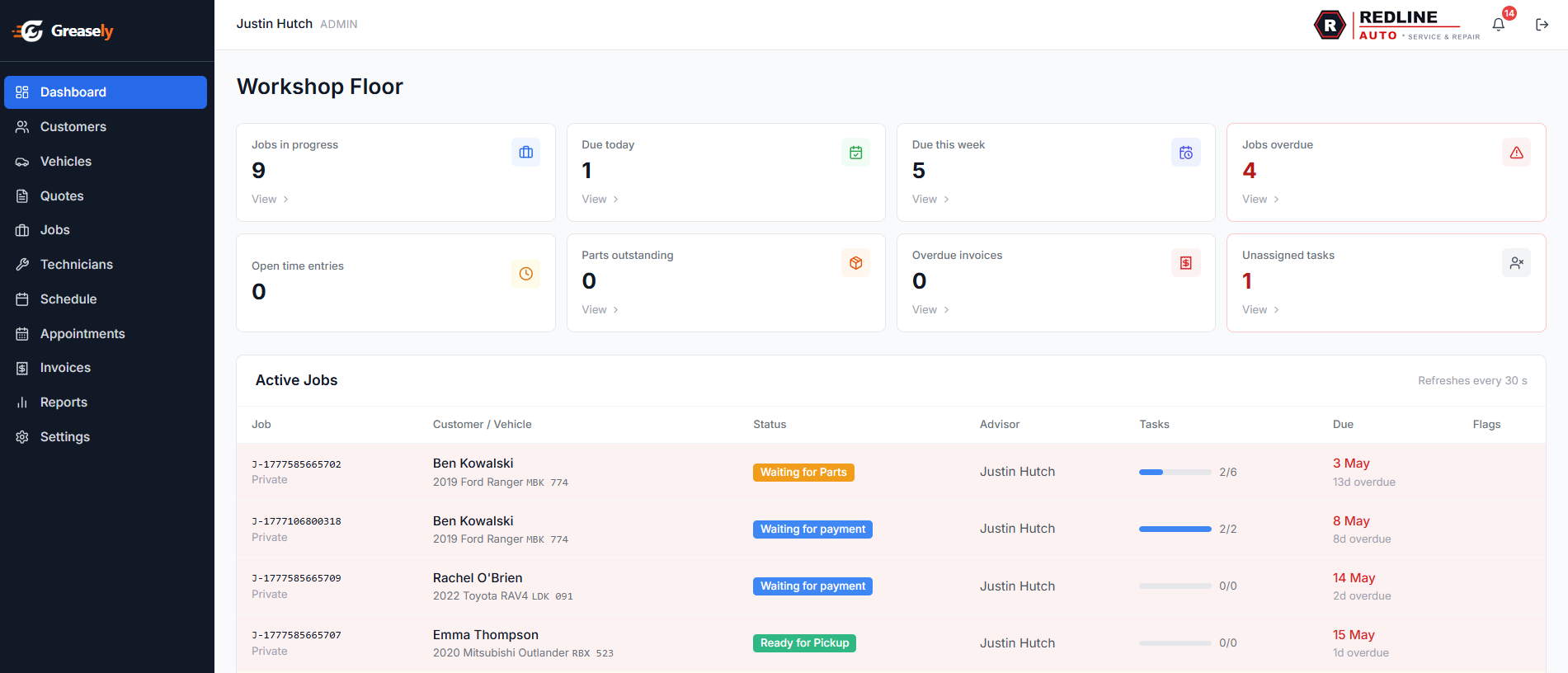
        <p class="feature-row__text">The Greasely dashboard puts your most important numbers front and centre. Understand your revenue, see which technicians are thriving, and spot bottlenecks before they cost you money.</p>
        <ul class="feature-list" aria-label="Dashboard features">
          <li><svg viewBox="0 0 24 24" fill="none" stroke="currentColor" stroke-width="2.5" stroke-linecap="round" stroke-linejoin="round" aria-hidden="true"><polyline points="20 6 9 17 4 12"/></svg> Live workshop floor view — all jobs at a glance</li>
          <li><svg viewBox="0 0 24 24" fill="none" stroke="currentColor" stroke-width="2.5" stroke-linecap="round" stroke-linejoin="round" aria-hidden="true"><polyline points="20 6 9 17 4 12"/></svg> Revenue, outstanding invoices, and cash flow summary</li>
          <li><svg viewBox="0 0 24 24" fill="none" stroke="currentColor" stroke-width="2.5" stroke-linecap="round" stroke-linejoin="round" aria-hidden="true"><polyline points="20 6 9 17 4 12"/></svg> Technician productivity and time utilisation</li>
          <li><svg viewBox="0 0 24 24" fill="none" stroke="currentColor" stroke-width="2.5" stroke-linecap="round" stroke-linejoin="round" aria-hidden="true"><polyline points="20 6 9 17 4 12"/></svg> Job throughput and average completion times</li>
        </ul>
      </div>
      <div aria-hidden="true">
        <div class="app-screenshot">
          <div class="app-screenshot__bar">
            <span class="app-screenshot__dot"></span><span class="app-screenshot__dot"></span><span class="app-screenshot__dot"></span>
            <span class="app-screenshot__url">app.greasely.com/dashboard</span>
          </div>
          <img src="/images/screenshots/screenshot-dashboard.png" alt="Greasely workshop floor dashboard with live job stats" loading="lazy">
        </div>
      </div>
    </div>
  </div>
</section>

<!-- ══════════════════════════════════════
     CTA
══════════════════════════════════════ -->
<section class="section" aria-labelledby="features-cta-heading">
  <div class="container">
    <div class="cta-banner">
      <h2 class="cta-banner__title" id="features-cta-heading">Experience every feature — free for 2 weeks</h2>
      <p class="cta-banner__sub">Your trial includes the full All Inclusive plan. No restrictions, no credit card, no commitment.</p>
      <div class="cta-banner__actions">
        <button class="btn btn-white btn-lg" onclick="openTrialModal()">Start Your Free Trial</button>
      </div>
      <p class="cta-banner__note">Free for 2 weeks &bull; Full All Inclusive access &bull; Auto-switches to Standard after trial</p>
    </div>
  </div>
</section>

<?php include 'includes/footer.php'; ?>